When to Use Default Headers
Fallback for DMARC Failures: If a campaign’s “From” address does not align with your dedicated sending domain’s DKIM/SPF records, MarketingPlex will use default header so that the message is still authenticated.
Maintain Consistent Branding: Even if a typo or misconfiguration causes a non-aligned “From,” recipients will see your brand’s domain in the From field rather than a rejected address.
Regulatory/Compliance Requirements: Industries requiring strict email authentication (finance, healthcare, etc.) should configure default headers to avoid DMARC rejections or quarantines.
Prerequisites
Before you can configure default headers, ensure that:
You’re in a Sub-Account
Only sub-accounts can add and manage dedicated sending domains and set default headers. Agency-level domains do not support per-sub-account default headers.
Dedicated Sending Domain Is Added and Validated
You have completed DNS setup (CNAME, DKIM, and SPF) for your custom sending domain (e.g., email.yourbrand.com).
MarketingPlexdisplays a green checkmark indicating your domain is validated under Settings → Email Service → SMTP Service → Dedicated Domain and IP
Setting Default Headers (From Name & From Email)
You can set up default "From address and Email" for dedicated domains under your account only for the Sub-account created domains.
Navigate to Sub-account Settings - Email Service -> SMTP Service -> Dedicated Domain and IP -> Set headers under dedicated domain.
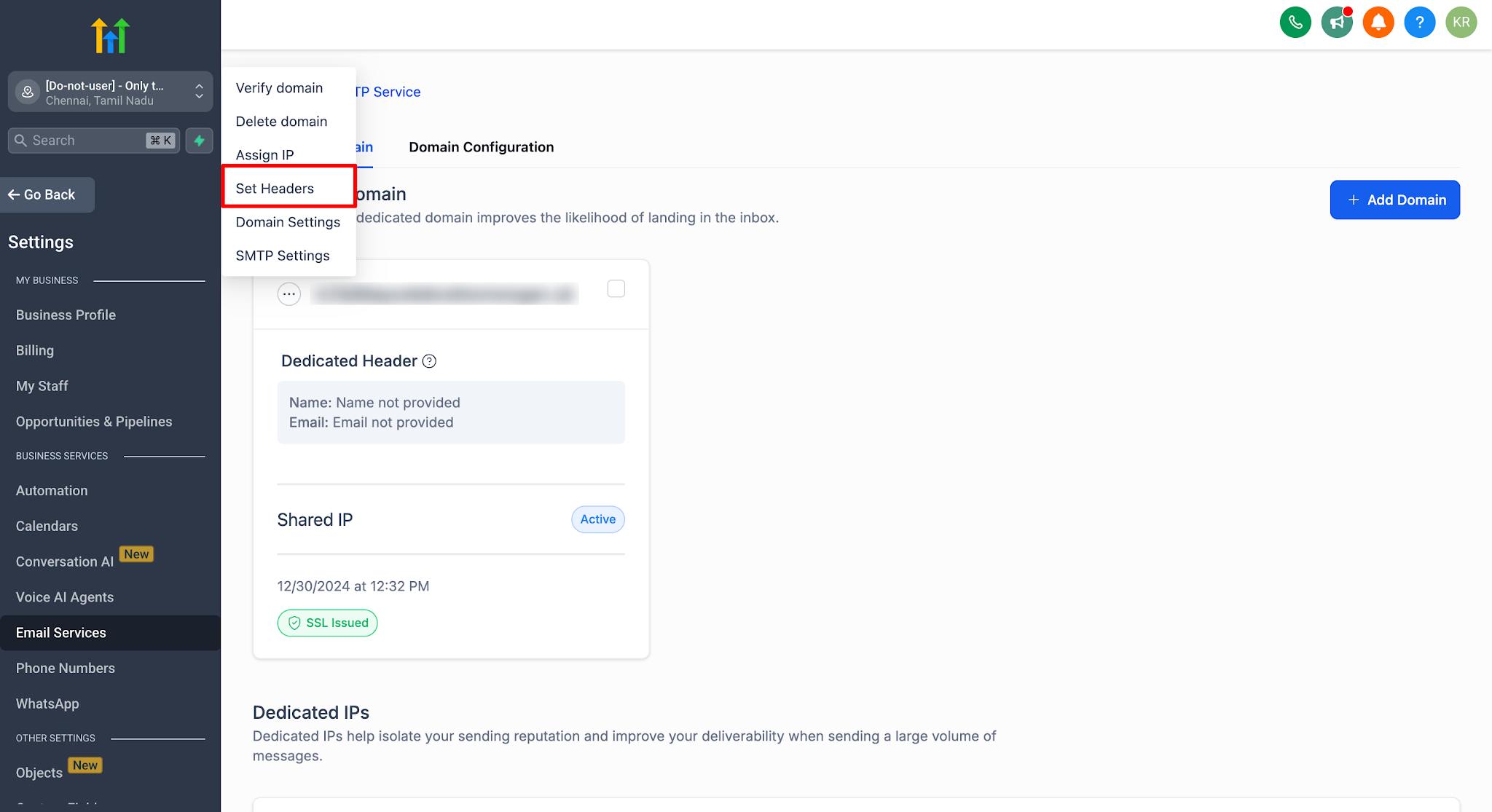
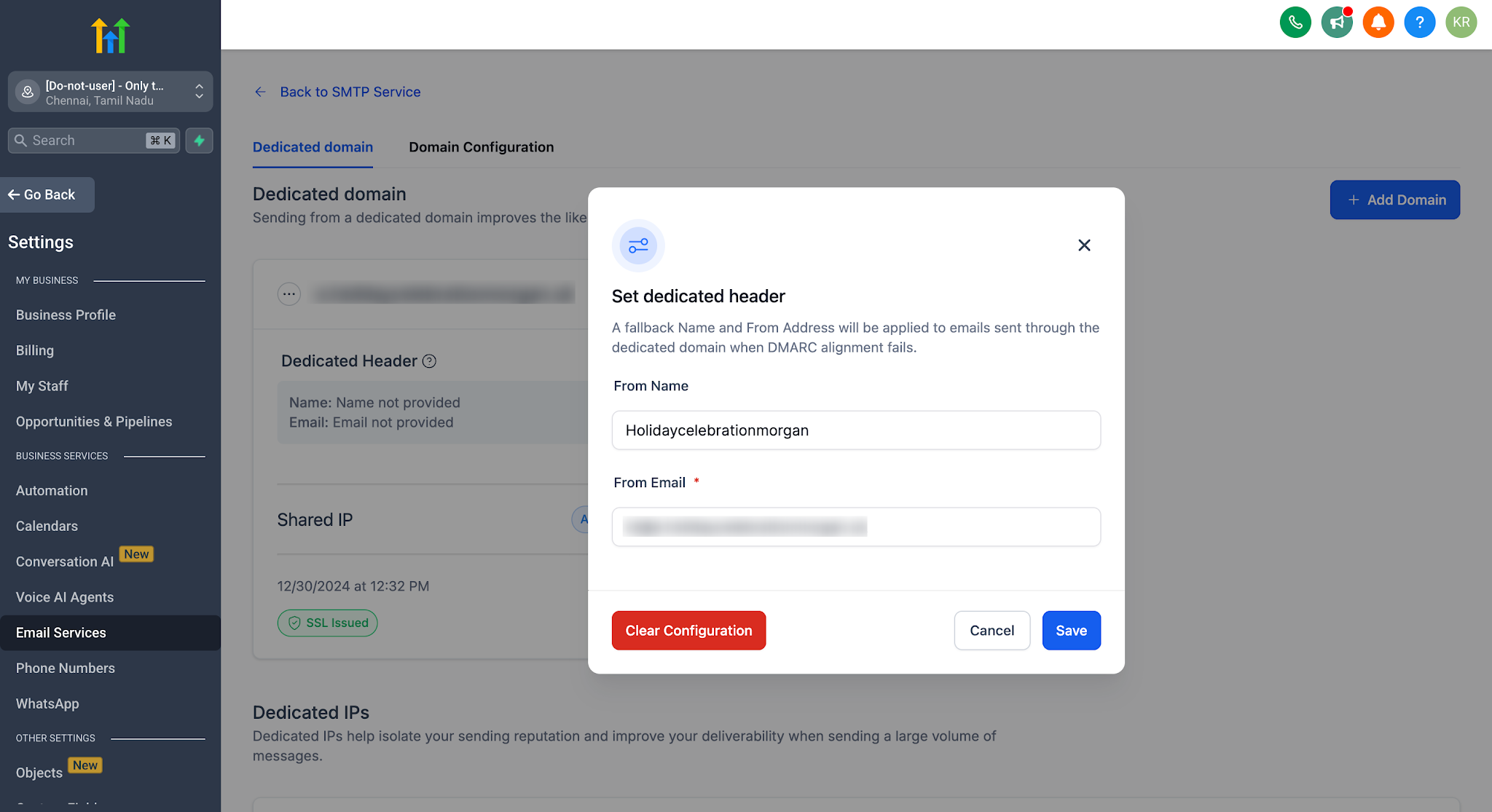
The designated header will be applied to emails sent through the dedicated domain when DMARC alignment fails.
How Default Headers Work in Practice
Campaign Configuration
When creating a broadcast or workflow email, you can set a campaign-level “From Name” and “From Email.
If you intentionally use a different “From Email” (e.g., sales@differentdomain.com) that does not align with your dedicated domain (email.yourbrand.com), DMARC will fail.
DMARC Check & Fallback
At send time, MarketingPlex checks DMARC alignment between the campaign’s “From” address and the sending domain’s DKIM/SPF records.
If alignment passes: The email goes out with the campaign’s chosen “From.
If alignment fails: MarketingPlex use the default header you configured under that dedicated domain.
Recipient Experience
Recipients see a valid “From Name” and “From Email” that matches your authenticated sending domain.
The email remains DMARC-compliant and is less likely to be rejected or flagged as spam.
Example: Finished Default Header Setup
Example scenario
Dedicated sending domain: email.yourbrand.com (validated)
Default Header From Name: YourBrand Support
Default Header From Email: support@email.yourbrand.com
Broadcast/workflow email configured by the user
Campaign From Name: Jane from YourBrand
Campaign From Email: jane@anotherdomain.com (does not align with email.yourbrand.com)
What Happens at Send Time
If the campaign From Email aligns with the dedicated sending domain, recipients see:
From: Jane from YourBrand <jane@email.yourbrand.com> (or whatever aligned address you selected)
If the campaign From Email does NOT align and DMARC alignment fails, MarketingPlex applies the Default Header and recipients see:
From: YourBrand Support <support@email.yourbrand.com>
How to Confirm It Worked
Send a test email using a non-aligned From Email (domain mismatch).
Check the received email’s “From” address and confirm it matches the Default Header.
Best Practices & Considerations
Configure Default Headers Before Sending: Always set up your fallback header prior to launching major campaigns. If DNS or DMARC misconfiguration occurs, your default header will kick in automatically.
Monitor Replies: The default “From Email” can be any address at your sending domain, but ensure mailboxes or aliases are monitored (e.g., support@yourbrand.com forwarding to the correct team).
Test Before Scaling: Send a small internal test using a non-aligned “From” address to confirm MarketingPlex defaults properly. Check both inbox placement and DMARC status.
Understand Propagation Delays: Changing DNS (especially DKIM/SPF/TXT records) can take up to 48 hours to fully propagate. Without default headers, messages sent during propagation may be rejected.
Segregate by Sub-Account: If you manage multiple brands or departments, create separate sub-accounts—each with its own dedicated domain and default headers—for isolated control.
Common Troubleshooting Scenarios
Was this article helpful?
That’s Great!
Thank you for your feedback
Sorry! We couldn't be helpful
Thank you for your feedback
Feedback sent
We appreciate your effort and will try to fix the article